Circuit
Quara supports quantum circuit simulation using Circuit class. Here we will briefly explain how to design, create, run and obtain results from a qunatum circuit.
[1]:
from quara.objects.circuit import Circuit
from quara.objects.composite_system_typical import generate_composite_system
from quara.objects.gate_typical import generate_gate_from_gate_name
from quara.objects.state_typical import generate_state_from_name
from quara.objects.mprocess_typical import generate_mprocess_from_name
Designing a circuit
In this notebook, we will focus on creating and executing a quantum circuit of the following diagram.
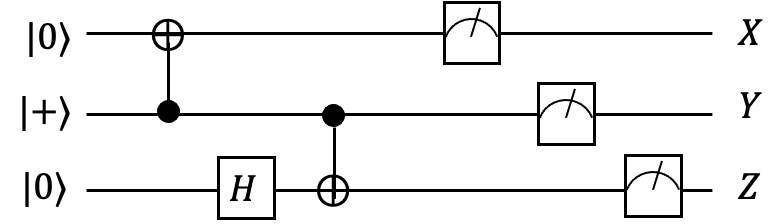
We will create a circuit object which is a 3 qubit system.
[2]:
circuit = Circuit(3, "qubit")
Then, we add gates by specifying gate_name just like we create quantum objects by names in Quara. "cx" means CNOT gate. The first number of the ids array in a “cx” gate specifies the control qubit and second number specifies the target qubit.
[3]:
circuit.add_gate([1,0], gate_name="cx")
circuit.add_gate([2], gate_name="hadamard")
circuit.add_gate([1,2], gate_name="cx")

# describe circuit
print(circuit)
Type:
Circuit

QObjects:
[
  {'Type': 'Gate', 'TargetIds': [1, 0], 'Name': 'cx'},
  {'Type': 'Gate', 'TargetIds': [2], 'Name': 'hadamard'},
  {'Type': 'Gate', 'TargetIds': [1, 2], 'Name': 'cx'},
]
The adding process in the previous cell is identical to the following code.
c_sys_1 = generate_composite_system("qubit", 1)
c_sys_2 = generate_composite_system("qubit", 2)

hadamard = generate_gate_from_gate_name("hadamard", c_sys_1)
cnot = generate_gate_from_gate_name("cx", c_sys_2, ids=[0,1])

circuit.add_gate([1,0], cnot)
circuit.add_gate([2], hadamard)
circuit.add_gate([1,2], cnot)
When you add a gate by specifying gate_name in the Circuit object, Quara Circuit will automatically generate multiple qubit gates such as CNOT and toffoli and the target qubits will be determined by the ids argument given to add_gate function.
Now we add measuremet operations, also by specifying mprocess_name just like generating MProcess objects in Quara.
[4]:
circuit.add_mprocess([0], mprocess_name="x-type1")
circuit.add_mprocess([1], mprocess_name="y-type1")
circuit.add_mprocess([2], mprocess_name="z-type1")

print(circuit)
Type:
Circuit

QObjects:
[
  {'Type': 'Gate', 'TargetIds': [1, 0], 'Name': 'cx'},
  {'Type': 'Gate', 'TargetIds': [2], 'Name': 'hadamard'},
  {'Type': 'Gate', 'TargetIds': [1, 2], 'Name': 'cx'},
  {'Type': 'MProcess', 'TargetIds': [0], 'KrausMatrixIndices': [1, 1], 'Name': 'x-type1'},
  {'Type': 'MProcess', 'TargetIds': [1], 'KrausMatrixIndices': [1, 1], 'Name': 'y-type1'},
  {'Type': 'MProcess', 'TargetIds': [2], 'KrausMatrixIndices': [1, 1], 'Name': 'z-type1'},
]
The process in the previous cell is identical to the following code.
c_sys_1 = generate_composite_system("qubit", 1)

measure_x = generate_mprocess_from_name(c_sys_1, "x-type1")
measure_y = generate_mprocess_from_name(c_sys_1, "y-type1")
measure_z = generate_mprocess_from_name(c_sys_1, "z-type1")

circuit.add_mprocess([0], mprocess=measure_x)
circuit.add_mprocess([1], mprocess=measure_y)
circuit.add_mprocess([2], mprocess=measure_z)
The index of a target qubit can be specified as the ids argument.
Now, we prepare for the circuit execution. We can either create initial states by our states or make the library do it. In this example, we will create initial states of every qubits using Quara’s features. Then we call the run() function by giving the array of states as initial_states argument. The first argument of run() (which is num_shots) specifies the number of execution of the circuit.
[5]:
c_sys_1 = generate_composite_system("qubit", 1)

qubit_0 = generate_state_from_name(c_sys_1, "z0")
qubit_1 = generate_state_from_name(c_sys_1, "z0")
qubit_2 = generate_state_from_name(c_sys_1, "z0")
initial_states = [qubit_0, qubit_1, qubit_2]

result = circuit.run(1000,initial_states=initial_states)
print(result)
Type:
CircuitResult

Circuit Overview:
[
  {'Type': 'Gate', 'TargetIds': [1, 0], 'Name': 'cx'},
  {'Type': 'Gate', 'TargetIds': [2], 'Name': 'hadamard'},
  {'Type': 'Gate', 'TargetIds': [1, 2], 'Name': 'cx'},
  {'Type': 'MProcess', 'TargetIds': [0], 'KrausMatrixIndices': [1, 1], 'Name': 'x-type1'},
  {'Type': 'MProcess', 'TargetIds': [1], 'KrausMatrixIndices': [1, 1], 'Name': 'y-type1'},
  {'Type': 'MProcess', 'TargetIds': [2], 'KrausMatrixIndices': [1, 1], 'Name': 'z-type1'},
]

Empirical distributions:
[
  [0.5 0.5],
  [0.523 0.477],
  [0.482 0.518],
]
You can generate initial states automaticaly by specifying initial_state_name="all_zero"
result = circuit.run(1000,initial_state_name="all_zero")
Which is identical to the following.
c_sys_1 = generate_composite_system("qubit", 1)
initial_states = [generate_state_from_name(c_sys_1, "z0") for i in range(3)]
result = circuit.run(1000,initial_states=initial_states)
Let’s look inside the results. CircuitResult class has 2 properties, raw_result and empi_dists. raw_result is the raw outcome data of MProcess objects implemented inside of Circuit. empi_dists is a List of empirical distributions which is calculated from raw outcome data.
[6]:
# raw_result
print(f"length of raw_result: {len(result.raw_result)}") # matches to num_shots
print(result.raw_result[0])

# empi_dists
print(f"length of empi_dists: {len(result.empi_dists)}") # matches to the nubmer of MProcess inside of circuit
print(result.empi_dists[0])   # the statistical result of first MProcess 'x-type1'
length of raw_result: 1000
[0, 0, 0]
length of empi_dists: 3
shape = (2,)
ps = [0.5 0.5]